
The eMath Method for Learning Math
Mathematics is a subject where new concepts build upon previously learned material. For example, when learning fractions, the new concepts are the numerator and denominator, and how to operate with these. However, addition and multiplication rules for integers still work in the same way asv before, and you will need these rules when adding and multiplying fractions. It is therefore very important to not leave any gaps when learning a topic, so that you can understand the new concepts that are introduced in later topics. The eMath method means that you as a student will master the topics presented in a self-study textbook efficiently and in a comparatively short time, without leaving any gaps in your understanding.

eMath Studio
This eMathStudio learning environment is focused on learning Mathematics, Physics, and other STEM subjects. It differs from traditional learning environments in that it provides full support for mastery learning.
Mastery learning
Mastery learning requires that you master the current topic before you continue with the next topic. Mastery of a topic is measured by how well you solve the assignments in the textbook. Mastering a topic in a self-study textbook requires that you get at least 80% of the assignments correct. Mastery learning is known to be a very efficient way of learning math, but it is seldom used in classroom teaching, because it requires more teacher resources than what is usually available.
eMath Studio features
Mastery learning is made possible in eMathStudio by the use of structured derivations for solving math problems, in combination with an editor for structured derivations and an automatic checker for checking the correctness of a structured derivations.
Structured derivation
Structured derivations is a simple language for writing the solution to a math problem in a way that is easy to understand both by a student and by a computer.
Derivation editor
Mastery learning requires that you master the current topic before you continue with the next topic. Mastery of a topic is measured by how well you solve the asignments in the textbook. Mastering a topic n a self-study textbook requires that you at least 80% of the assignments correct. Mastery learning is known to be a very efficient way of learning math, but it is seldom used in classroom teaching, because it requires more teacher resources than what is usually available.
Automatic checking
The automatic checker reads a structured derivation step by step and checks the correctness of each step. Steps that are proved correct are marked with a check mark by the checker, while steps that cannot be proved correct are marked with a question mark. The automatic checker gives you immediate feedback on your own solution, while you are working on the problem. Your solution is correct if the checker has proved each step correct. Otherwise, you need to go back to your solution and fix the unproved steps. And then check again and fix anew, until the solution is correct. In this way, you learn the topic at hand by having the errors in your own solution explicitly pointed out, and figuring out how to fix them.
Mastery learning
This eMathStudio learning environment is focused on learning Mathematics, Physics, and other STEM subjects. It differs from traditional learning environments in that it provides full support for mastery learning. Mastery learning requires that you master the current topic before you continue with the next topic. Mastery of a topic is measured by how well you solve the assignments in the textbook. Mastering a topic in a self-study textbook requires that you get at least 80% of the assignments correct. Mastery learning is known to be a very efficient way of learning math, but it is seldom used in classroom teaching, because it requires more teacher resources than what is usually available.
Mastery learning is made possible in eMathStudio by the use of structured derivations for solving math problems, in combination with auto1matic correctness checking of structured derivations. Structured derivations is a simple language for writing the solution to a math problem in a way that is easy to understand both by a student and by a computer. The automatic checker reads a structured derivation step by step and checks the correctness of each step. Steps that are proved correct are marked with a check mark by the checker, while steps that cannot be proved correct are marked with a question mark. The automatic checker gives you immediate feedback on your own solution, while you are working on the problem. Your solution is correct if the checker has proved each step correct. Otherwise, you need to go back to your solution and fix the unproved steps. And then check again and fix anew, until the solution is correct. In this way, you learn the topic at hand by having the errors in your own solution explicitly pointed out, and figuring out how to fix them.
Study path

Each self-study book math has a designed a Study path that you should follow. The study path symbol is shown on the right. It marks which assignments you need to solve in order to master the topic at hand, and how many points you get from solving the assignment (1 = easy, 2 = medium, 3 = some challenge). None of the assignments are difficult, if you have read the theory for the assignments.
Mastering a topic
Mastery of a topic is measured by how well you have solved the assignments of the topic. The assignments that you need to solve on an assignment page are marked with the Study path symbol. The total number of points that you have earned for an assignment page is shown on the top of the page, together with the percentage of the required points that you have already gathered. You get full points for an assignment when the solution is correct, and you get no points when the solution is not correct. You show mastery of a topic by collecting at least 80% of the maximal points in the study path for this assignment page. You can move to the next topic when you have achieved mastery of the current topic.
Even if 80% is sufficient, you should strive to solve all of the study path assignments and get them corrrct. The more points you get for a topic, the better you have learnt it, and the easier it is to undestand subsequent topics. You are allowed to continue with the next topic before you have mastered the current topic. Sometimes this will clarify issues that you did not understand earlier. However, you should go back to the unfinished topics and solve the remaining assignments so that you get mastery of this topics too.
Solving assignments
You write a solution to an assignment and check the correctness of the solution in the Solution tool. A solution to an assignment has two main parts:
- The derivation (mathematical reasoning, calculation, proof) that leads from the initial assumptions to a final conclusion. We refer to this tas he derivation of the answer.
- The answer that you give to the problem stated in the assignment.
The derivation is written in the Solver tool as a structured derivation. Its mathematical correctness is checked by the automatic checker in the Solver tool. The answer is also checked in the Sover tool. Your solution is correct when both the derivation and the answer is correct. You get the full points for the assignment when the solution is correct. Otherwise you get zero points
Solver tool
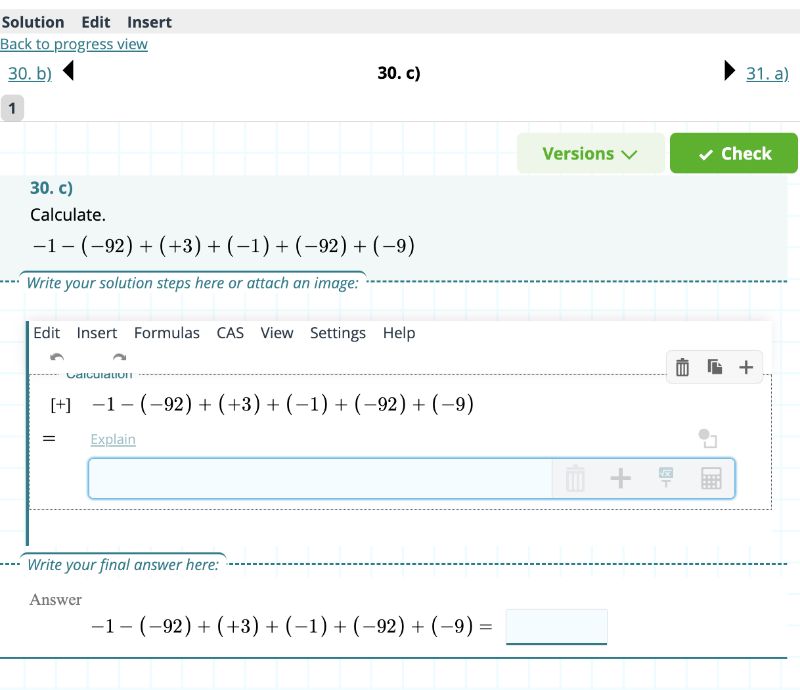
You solve assignments in the Solver tool. Below is an example of the Solver tool view. It has four parts: a navigation bar to the previous or next assignment, the assignment number and assignment text, the derivation of the answer, and, the answer to the assignment
Finding the correct solutions
The requirement that you only get points for a totally correct solution may seem harsh. However, finding a correct solution is made much simpler by using the automatic checker. The checker gives immediate and detailed feedback on your solution.
- The checker marks all derivation steps that have been proved correct with a green check mark (V).
- The checker marks all unproved derivation steps with an orange question mark (?).
- A derivation step that the checker does not understand (a syntax error) is marked with a redd x-mark (X)
- The derivation is correct if each step has been proved correct.
- The automatic checker also checks your answer, and tells you whether it is correct or not.
You have a correct solution of the assignment when the automatic checker says that both the derivation and the answer is correct. If there are problems in your solution, either in the derivation, or the answer is not correct, then you need to back to the solution, identify the problems and fix them, and check again, until you get a correct solution.
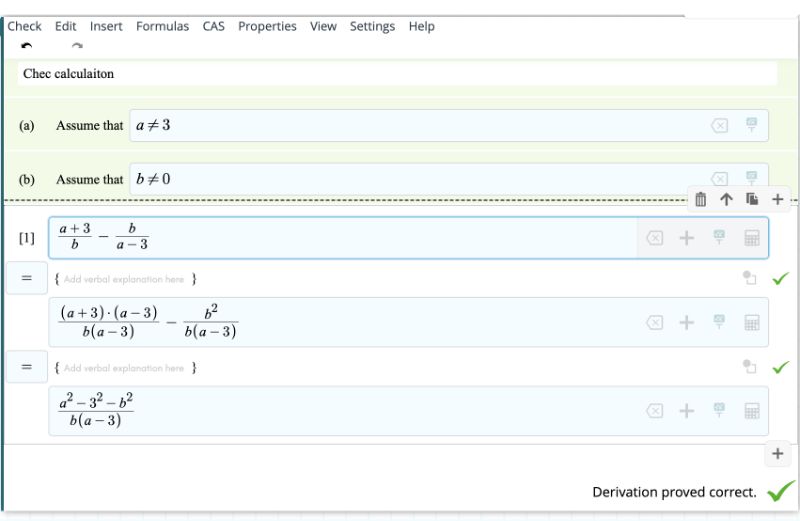
This approach is an efficient way to learn the topic. Learning happens when you go back to your solution, trying to understand what the problem is, and working out how to fix the problem.
There are fewer assignments to solve in mastery learning, but you have to work more on each assignment. In the end, this is the way you will eventually master the topic and become ready to move on to the next topic.
Status of an Assignment
The system shows you the status of each assignment on the assignment page with a coloured diamond, as shown on the right
– the assignment has not been stared
– assignment has been started but has not been checked,
– assignment has been checked and solution is not correct
– assignment has been checked and solution is correct.
Following your progress
The eMathStudio includes the Progress tool in which you can follow your own progress in the textbook. The progress tool shows three main tables:
- The study path. This table shows an overview of the topic that you need to master. For each topic, it shows which assignments need to be solved, and whether the assignment has been solved or not. You see the total points that you have collected this far for the topic. The topic is marked as mastered when you have solved 80% of the study path assignments correctly.
- All assignments. The textbook contains more assignments than what are requied for mastery. You are free to solve additional assignments to get a better understanding of the topic. This table shows all the topics in the textbook with all assignments for each topic. For each assignment, you see whether you have solved the assignment, and whether the solution is correct.
- All solutions. This table lists all assignments that you have worked on, and the status of each assignment.
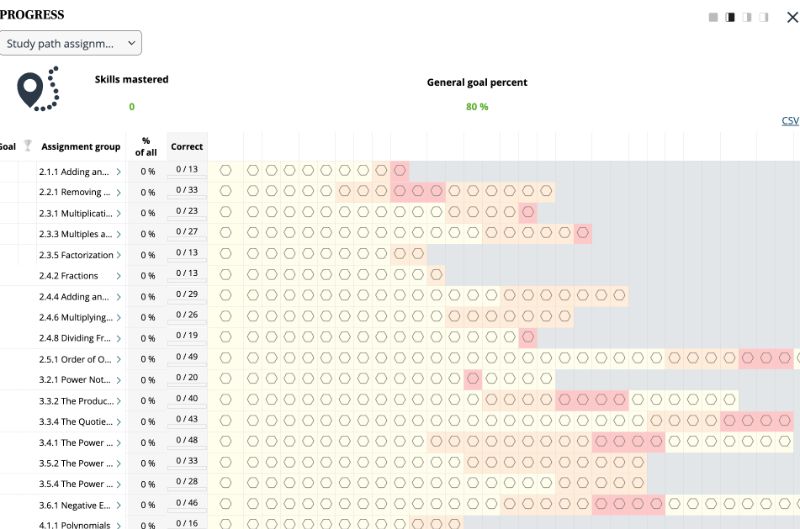
Clicking on an assignment in the Progress tool opens up the Solver tool for this assignment, allowing you to continue with the problem. Clicking on the Progress button in the Solver tool takes you back to the Progress tool.