The eMath Method
Mathematics
Mathematics is a subject where new concepts build upon previously learned material. For example, when learning fractions, the new concepts are the numerator and denominator, and how to operate with these. However, addition and multiplication rules for integers still work in the same way as before, and you will need these rules when adding and multiplying fractions. It is therefore very important to not leave any gaps behind when learning a topic, in order to understand the new concepts that are introduced in later topics.
Mastery learning
The Mastery learning approach requires that you master the current topic before you continue with the next topic. Mastery of a topic is measured by special tests or by how well you solve the assignments in the textbook. In the eMath method, mastering a topic requires that you get at least 80-90% of the test assignments correct. Mastery learning is known to be a very efficient way of learning math, but it is seldom used in classroom teaching, because it requires more teacher resources than what is usually available for standard education.
eMathStudio
The eMathStudio digital learning environment provides full support for mastery learning in STEM subjects (Mathematics, Physics, Engineering, etc.). eMathStudio with mastery learning allows the student to master the topics in a course or with a self-study textbook.
Mastery learning in a course is made possible in eMathStudio by the three important features:
- The environment supports a simple language, structured derivations, for writing and structuring solutions to math problems
- The environment provides a digital editor for structured derivations
- The environment provides an automatic checker for checking the correctness of a structured derivations.
- The environment follows the student’s progress through the course, encouraging the student to master the present topic before continuing on to the next topic.
Students can work on a mathematical subject on their own individual pace, without leaving any gaps in their understanding.
eMathSudio rooms
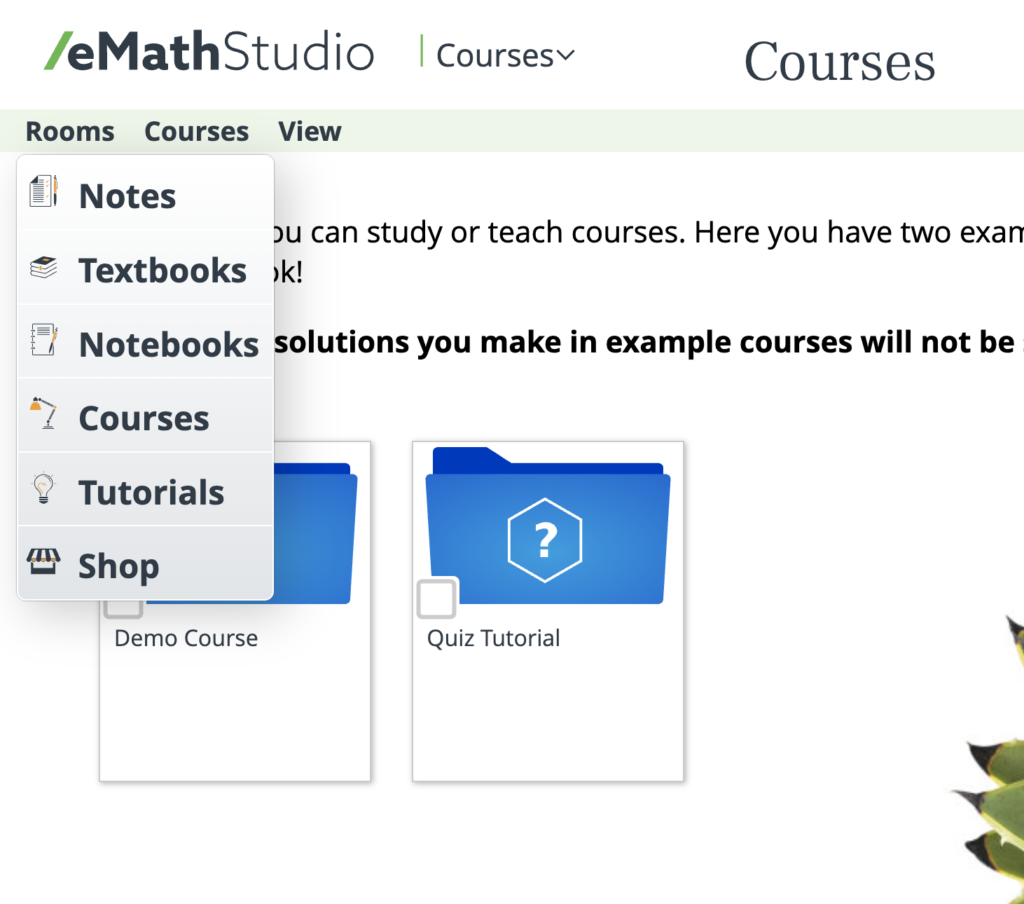
eMathStudio is a very versatile learning environment. It has special sections (called rooms) for note taking, textbooks, notebooks, courses, and tutorial material.There is also a web shop where you can buy subscription time, checker quota, textbooks, as well as enrol in a courses.
The eMath method
The eMath method uses eMathStudio with mastery learning for studying a specific subject. The study can take the form of a traditional course in a class, it can be an online course, or it can be a self-study course. The basis is an eMath textbook that is used as a course book or self-study book. The textbook is dividd into a number of topics, each with a clearly defined purpose. The textbook may also contain videos and hands-on training for the topic. Each topic comes with a collection of assignments that the student has to solve to show mastery. Learning a topic proceeds as follows:
- You start on a new topic by reading the theory and studying the examples of the topic.
- You then tackle the assignments given for the topic.
- You solve an assignment as follows:
- First analyse the problem and devise an initial plan for solving it (the plan would usually be based on examples in the theory).
- Use the editor to write a structured derivation according to the plan, filling in details as needed.
- Check the correctness of the derivation with the checker. The checker also checks if the answer is correct
- If the derivation and the answer are both correct, then you have a correct solution. You can then move on to the next assignment.
- If there are problems in the derivation, or the answer is not correct, then you need to go back to your solution, identify possible errors, and fix them. And then check again. Repeat this until you get a correct answer
- You can move on to the next topic when you have a correct solution to at least 80% of the required assignments.
Advantages
The eMath methd solves a number of basic problems in todays math education.
- It supports individual learning paths, where each student can proceed at his/her own pace. Slow learners have ample time to learn and practice with the assignments, while fast learners can proceed faster through the topic without having to wait for the rest of the class.
- The method guarantees that no gaps are left behind, making the student much better prepared to tackle the remaining topics.
- The checker gives students immediate and personal feedback on their solution to the assignment. The student sees the problems in their solution while they are working on the assignment. They can then fix the errors directly with the editor. Contrast this with hafing to wait for the teacher to show a correct solution much later, when the problem and its solution are already forgotten.
- Also, the student gets the feedback directly on their own solution. Rather than seeing the teacher present a different solution to the same problem. The checker does not use any specific solution as a model, it will accept any solution that is mathematically correct.
- The student learns the topic when analysing the problems in their own solution and fixing the errors there.
- eMathStudio provides tools that make it easy to share a solution with others. This makes it easy for the student can get help when stuck with a problem.
Study path
An eMath textbook has a built-in study path that the student can follow. The study path symbol is shown on the right. It marks which assignments need to be solved in order to master the topic at hand, and how many points are given for solving the assignment. Easy assignments give one point, medium difficulty give two points, and slightly more challenging give three points. The difficulty of an assignment is also marked with stars. None of the assignments are difficult when you have read the theory for the assignments. The study path guides the student in a self-study book. In a course, the teacher if free to choose the assignments that the students should solve.
The total number of points that the student has earned for a topic is shown on the top of the assignment page, together with the percentage of the required points that the student has already gathered.
Mastering a topic
Mastery of a topic is measured by how well the student have solved the assignments in the topic. The student gets full points for an assignment when the solution is correct, and no points when the solution is not correct. Mastery of a topic requires at least 80% of the maximal points for the assignment of a topic..
Even if 80% is sufficient, the student should strive to solve as many as possible of required assignments and get them correct. The more points, the better the understanding of the topic, and the easier it is to understand subsequent topics. The student is, however, allowed to continue with the next topic before having mastered the current topic. Sometimes this will clarify issues that were not understood earlier. But the student should then go back to the unfinished topics and solve the remaining assignments there, to get mastery of these topics too.
Solving assignments
You write a solution for an assignment in the solution tool. A solution to an assignment has two main parts:
- The derivation (mathematical reasoning, calculation, proof) that leads from the initial assumptions to a final conclusion. We refer to this tas he derivation of the answer.
- The answer that you give to the problem stated in the assignment.
The derivation is written in the Solver tool as a structured derivation and Its mathematical correctness is checked by the automatic checker. The checker also checks whether answer is correct. The solution is correct when both the derivation and the answer are correct. The student get the full points for the assignment when the solution is correct. Otherwise he/she gets zero points
Solver tool view
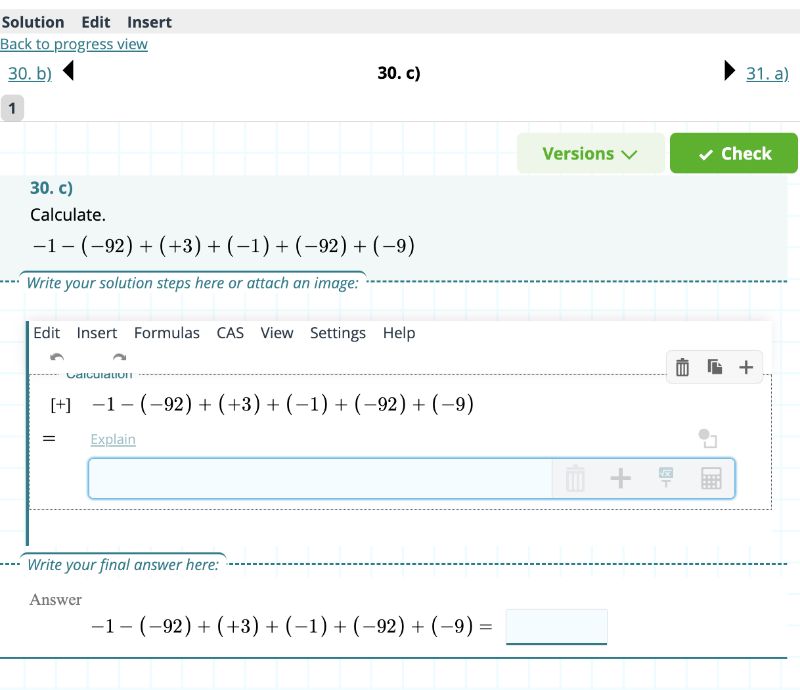
Below is an example of the Solver tool view. It has four parts: a navigation bar (to the previous or next assignment), the assignment number and assignment text, the derivation of the answer, and, the answer to the assignment
Finding the correct solutions
The requirement that you only get points for a totally correct solution may seem harsh. However, finding a correct solution is made much simpler by using the automatic checker. The checker gives immediate and detailed feedback on your solution.
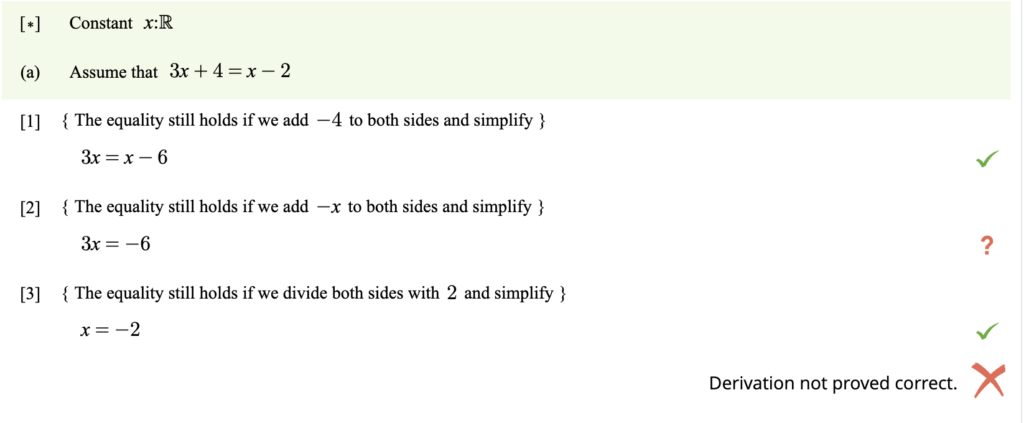
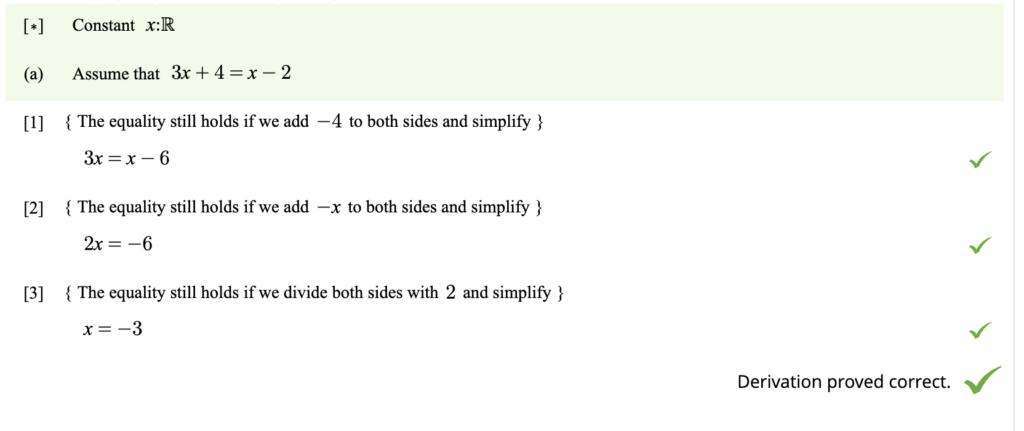
- The checker marks all derivation steps that have been proved correct with a green check mark (V).
- The checker marks all unproved derivation steps with an orange question mark (?).
- A derivation step that the checker does not understand (a syntax error) is marked with a red x-mark (X)
- The derivation is correct if each step has been proved correct.
This is an efficient way to learn the topic. Learning happens when you go back to your solution, trying to understand what the problem is, and working out how to fix the problem. There are fewer assignments to solve with mastery learning, but you have to work more on each assignment. In the end, this is the way you will eventually master the topic and become ready to move on to the next topic.
Checking view
Derivation with an error:
Error fixed:
Status of an Assignment
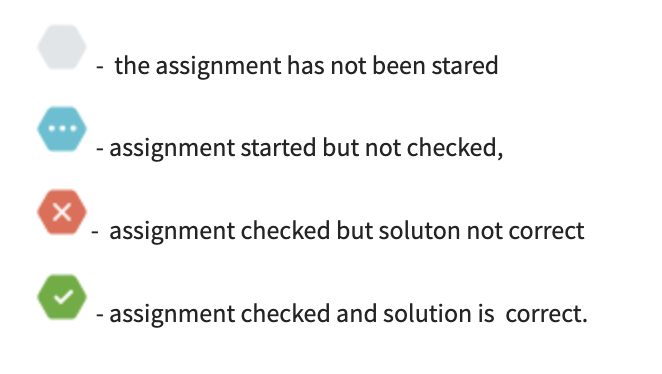
The system shows you the status of each assignment on the assignment page with a coloured diamond, as shown on the right
Markings
Following your progress
The eMathStudio includes the Progress tool in which you can follow your own progress in the textbook. The progress tool shows three main tables:
- The study path. This table shows an overview of the topic that you need to master. For each topic, it shows which assignments need to be solved, and whether the assignment has been solved or not. You see the total points that you have collected this far for the topic. The topic is marked as mastered when you have solved 80% of the study path assignments correctly.
- Homework. This table is available in a course. it shows all the homework assigned by the teacher for a course. All home work sets are shown with all assignments in each set shown, as well as the present solution status of each assignment.
- All assignments. The textbook contains more assignments than what are required for mastery. You are free to solve additional assignments to get a better understanding of the topic. This table shows all the topics in the textbook with all assignments for each topic. For each assignment, you see whether you have solved the assignment, and whether the solution is correct.
- All solutions. This table lists all assignments that you have worked on, and the status of each assignment.
Study path – progress table
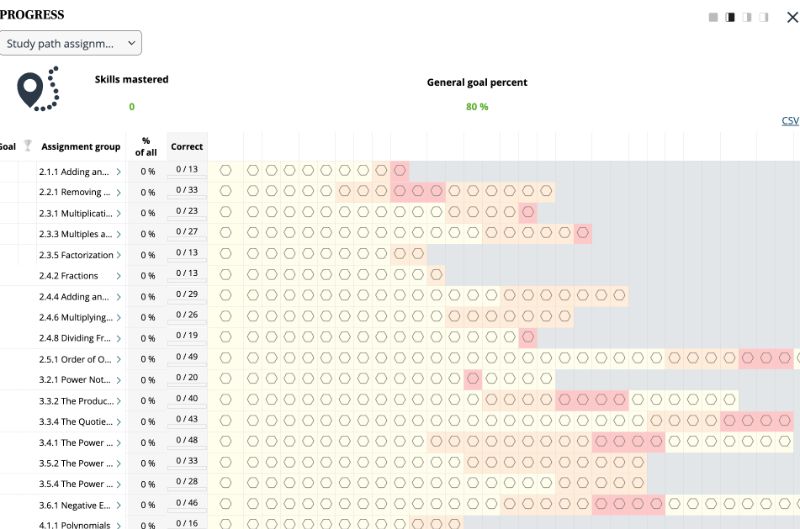
Clicking on an assignment in the Progress tool opens up the Solver tool for this assignment, allowing you to continue with the problem. Clicking on the Progress button in the Solver tool takes you back to the Progress tool.
Writing and sharing notes in the Notes room
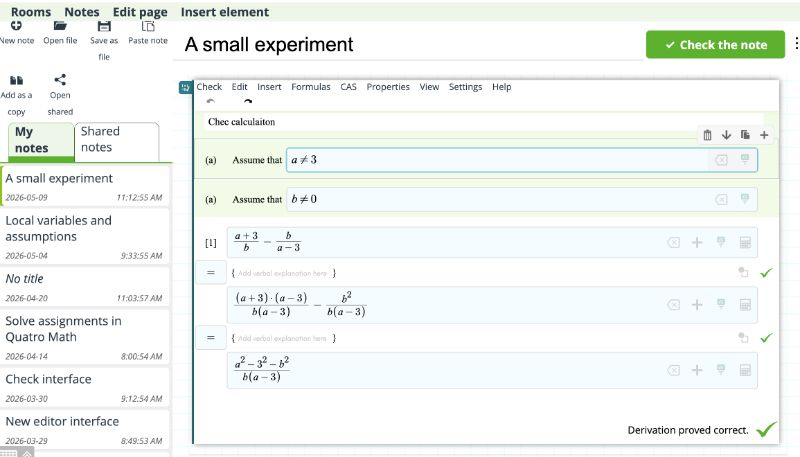
In addition to the eMath textbook, you may also use the Notes room to take notes, try out the theory with your own examples, and to get help from others. Here you can
- write your own notes, with text elements, images, embedded videos, calculations and derivations,
- open, read and comment notes that others have shared with you,
- get help with an assignment by sharing your solution with others, and asking them for comments,
- printing your note as a pdf file, to share it by email or other social media,
- save your note on your own computer and open a previously saved note
- check the derivations in a note.
Essentially, Notes is a full fledged environment for creating small mathematical articles, checking the derivations in the article, and sharing it with others as pdf or as editable eMathStudio notes.
Notes room view
Tutorials in eMathStudio
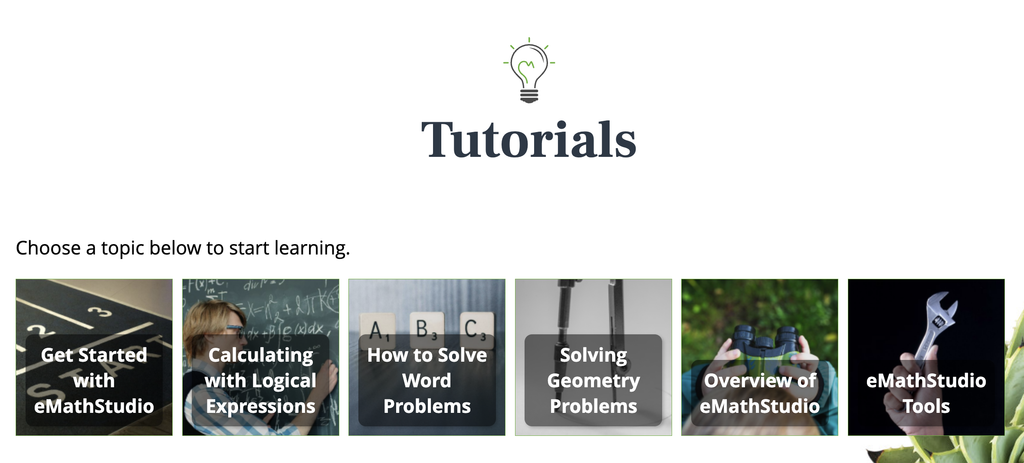
The following tutorials are quite useful when you star using eMathStudio:
Get started with eMathStudio, pages 1 – 4. This tutorial shows how to write mathematical formulas in eMathStudio, how to write and check calculations, and how to solve linear equations with logical calculations
Overview of eMathStudio, pages 1-4. This tutorial shows how to work in eMathStudio, how to work with the eMath textbooks, andhow to use Notes to get help when you are stuck at some problem.
eMathStudio tools. pages 1-2. This tutorial shows how to solve assignments in the solution tool, and how to follow your progress in the Progress tool.
Later on, you will find the other tutorials also useful. You will learn how to use the other rooms of eMathStudio, how to solve more challenging math problems with structured derivations, and how the correctness checker works in more complex derivations.
Present tutorials