
Tutored Courses
We offer online courses based on eMath textbooks. An online course is essentially a course that is given during a limited time. The course is essentially a self-study course, but with a peronal tutor that gives you feedback on your assignment solutions, and helps you when you have difficulties with solving these. Each student of the course goes through the course on his/her open pace. You can start anytime during the course duration (up till one month before the course ends). The tutoring stops when the course period ends, but you can continue working on the course for yourself, as long as you have an active subscription.
The course is carried out using the same mastery learning method as in self-study courses. This means that you can continue to the next topic in the self-study book when you have mastered the present topic. You show mastery of a topic by solving at leat 80 % of the topic assignments correctly. This will guarantee that you have fully understood the topic before starting on the next topic. You have passed the course when you have mastered all topics in the course, and will get a diploma stating this.
Teaching and feedback in the course
The course uses a flipped classroom approach. This means that you study the theory part for yourself, and then solve the assignment required for the topic, at your own pace. The course has a video classroom, where the teacher can explain general issues and answer questions. There is also a course chat room, where you can ask personal questions of the teacher or tutor, and get personal answers. Your tutor will give you personal feedback on an assignment when needed. The tutor will look at the assignments where you have problems in finding a correct solution, and give you advice on how to proceed with the assignment.
Course enrolment
You enrol in a course by buyng the course package from the web shop. The course package includes
- Access to the course book
- Subscription time for the course period
- A checking quota of 500 checks/month. The checks can be used freely over the whole course period
- Access to the Notes and Notebook room, so that you can freely take notes and create your own notebooks
Buying the course package will automatically place the course in your Courses room. Clicking on the course icon will open the course, and you are ready to start studying. Read first the theory for each topic, and then start solving the assignments given for the course. The assignments that need to be solved are marked with the self-study symbol.
Course room
The Course room shows you all the courses that you are preently actively engaged in (Active tab), courses that you have taken but are not active in anymore (Archived tab), courses that are available to you (Availabler tab), as well as courses that you have discarded (Trash tab).
Solution tool
You solve assignments in the self-study book with a special solution tool. The solution consists of two parts: (1) the answer to the problem given in the assignment, and (2) the derivation or calculation that shows how you have arrived at the answer. The solution is correct when both are correct.
Structured derivations
The derivation is written in a special format called a structured derivation. The purpose of structured derivations is to teach you how to reason when solving mathematical problems. It is a very simple language, with the special advantage that a computer can check whether your derivation is correct. The solution tool comes with a structured derivation editor that makes it easy to write and edit structured derivations.
Automatic checker
The solution tool comes with a structured derivation checker, that checks the correctness of you solution and points out all the problematic steps in you solution. The checker gives you immediate feedback on your own solution, so that you can identify the possible errors in the solution and fix these directly. After fixing the problems, you check again. You continue fixing problems until the checker says that your solution is correct.
Study path
The assignments that you you need to solve for a topic are marked with a study path symbol, which also shows how many points you get for solving the assignment correctly. You get 1 point fo easy assignment, 2 points for standard ones, and 3 points for a slightly more challenging problems.
Solution status
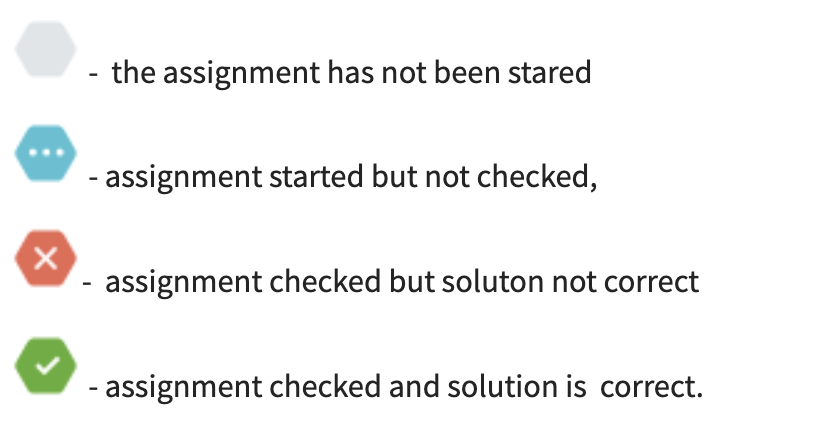
The assignment page shows the solution status of each assignment (not started yet, started but not checked, solution is not correct, and solution is correct).
Progress table
You can get an overview of all the topics and the assignments in these in the progress tool. The progress table shows directly which assignments need more work in order to master the topic.
Teaching a course
If you registered as a teacher, you can also create your own course book. This can be based on some available textbook in eMathStudio, your own notebook that you have written earlier, or you can start creating the course book from scratch. A course book based on a textbook in Textbooks can be edited freely: add new pages and chapters, remove pages or chapters, reorder the page and chapters, and edit the contents of any page. Any changes you make in the course book will be immediately visible to all your students. Your course book will be immediately available to all student registered in the course when the course is started. Contact us directly if you are interested in this possibility.